


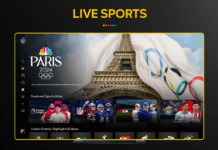


Peacock works like most thirdparty streaming apps on Roku: the app is free to download, but full access to its library is locked behind a subscription. You can install Peacock from the Roku Channel Store at no extra charge, then sign in with a free or paid Peacock account visit peacocktv.com/tv.
Historically Peacock offered a large adsupported free tier with thousands of hours of movies, shows, news, and sports, and Roku highlighted that “you can stream Peacock totally free.” Over time, however, Peacock has shifted focus to its paid plans, so premium originals, most live sports, and full seasons of many series require a subscription.
Peacock Plans and Prices on Roku
When you subscribe through Peacock (and then watch on Roku), there are currently two main paid tiers after the July 2025 price increase.
- Peacock Premium (with ads)
- About 80,000+ hours of content including most movies, full series, originals, and many live sports.
- New price: per month or per year in the US.
- Shows include NBC and Bravo nextday episodes, plus over 50 alwayson channels.
- Peacock Premium Plus (fewer ads)
- Includes everything in Premium with mostly adfree viewing (some live events still show ads).
- Adds offline downloads on mobile and 24/7 live access to your local NBC station.
- New price: per month or per year.
Some users may still see limited free content after installing the app, but all flagship titles and marquee live sports are positioned behind Premium or Premium Plus.
Peacock tiers overview
| Feature | Roku app cost | Peacock free content on Roku | Peacock Premium on Roku | Peacock Premium Plus on Roku |
| App download on Roku | Free | Free app, limited content | Paid subscription required | Paid subscription required |
| Monthly price | 0 | 0 | 10.99 USD/month | 16.99 USD/month |
| Ads | N/A | Yes, adsupported | Yes (standard ads) | Mostly adfree, limited ads |
| Library size | N/A | Smaller slice of catalog | Full catalog (80,000+ hours) | Same as Premium |
| Live NBC channel | N/A | Not included | Select live events only | Local NBC 24/7 included |
| Offline downloads (mobile) | N/A | Not available | Not available | Available on select titles |
Is Roku Itself Free to Use?
Roku does not charge a monthly platform fee; you only pay for the streaming services you subscribe to, such as peacocktv.com/tv/samsung, Netflix, or others. Many Roku channels are fully free (with ads), while paid services need separate subscriptions even though their channels install for free.
- Once your Roku is set up, you can add the Peacock channel from “Streaming Channels” at no cost.
- You then log in with your Peacock credentials—free or paid—to see whichever content your plan includes.
This means Peacock is “free on Roku” only in the sense that Roku does not add extra charges on top of Peacock’s own pricing.
Read More – How to Activate Paramount Plus on Your Roku Via paramountplus.com/roku.
What Can You Watch for Free?
Peacock has long marketed itself as having “the only free tier of premium content,” giving users access to thousands of hours of movies, classic series, and some live sports and news without paying. Even now, many accounts still surface a sampling of free, adsupported episodes, older shows, and rotating movies.
Typical examples of what may be accessible without upgrading include:
- A selection of classic NBC comedies and dramas from networks like NBC, Bravo, USA, and SYFY.
- Sample episodes or partial seasons of Peacock Originals, designed to upsell Premium.
- Some news clips, highlights, and limited live sports or replays.
However, highdemand series, full past seasons, dayanddate movie premieres, and premium sports such as major football or Olympics coverage are reserved for paying subscribers.
Read More – How to activate Paramount Plus with Spectrum Via paramountplus.com/activate.
How to Get Peacock on Roku
Setting up Peacock on your Roku only takes a few steps and does not cost anything by itself.
- On your Roku home screen, go to Streaming Channels to open the Roku Channel Store.
- Search for Peacock and select the official Peacock channel from NBCUniversal.
- Choose Add channel to install it to your Roku.
- Open Peacock, then either sign in with an existing account or create a new one and pick a plan.
- Start streaming free samples or your Premium / Premium Plus library depending on your subscription.
In some cases, cable or broadband bundles from providers like Xfinity or certain promotions may include Peacock Premium at no extra charge, letting you watch on Roku for “free” as part of a larger package.
You May Also Like – Do I need Spotify Premium to pair my device Via spotify.com/pair.
In everyday terms, Roku does not charge to host Peacock, and you can install the app and sample some content free, but a paid Peacock subscription is now the standard way to unlock its full library and live sports on Roku.